The Purplefish Pipeline || May: Twice as Fast, More Accurate, and a Better Way to Review Your MTO
In May 2026, we cut processing time in half, shipped on-platform MTO review, and exceeded 99.5% BOM extraction accuracy.
Purplefish is an AI-powered material takeoff platform for pipe fabrication contractors. In May 2026, we cut processing time in half, shipped on-platform MTO review, and exceeded 99.5% BOM extraction accuracy. We've been heads down the last few weeks making takeoff from piping isometrics faster, more accurate, and easier for pipe estimators to work with. Here's what changed.
Purplefish Takeoff Processing Speed: cut in half
We cut our processing time for material takeoff (MTO) from ISO's roughly in half. Times vary by ISO packet, but to give you a real example: we recently processed a 210-page packet in an hour, including human QA review. Before this week, that same packet would have previously taken 2 to 3 hours to process.
For context, every packet that goes through Purplefish gets two passes before it reaches the customer. First, our Document Engine uses multiple AI and computer vision models to read the drawings and pull the BOM data. Our Document Engine by itself is extremely accurate (99.5% in fact, see below), but to give you an added layer of security and confidence, a human reviewer then goes through it to make sure nothing big is missing and every size and quantity is right.
Full MTO/BOM Review, right on the platform
Up until now, the main output of Purplefish was an Excel export. That's still there. But we brought the full MTO onto the platform itself so you can review, customize, and spot-check everything before you export to Excel.
Here's what that unlocks for estimators:
1. Jump from any line item in the full BOM to the exact drawing it came from. Click a row, see the page. No more paper cuts from flipping through a stack of ISOs trying to find where a fitting showed up.
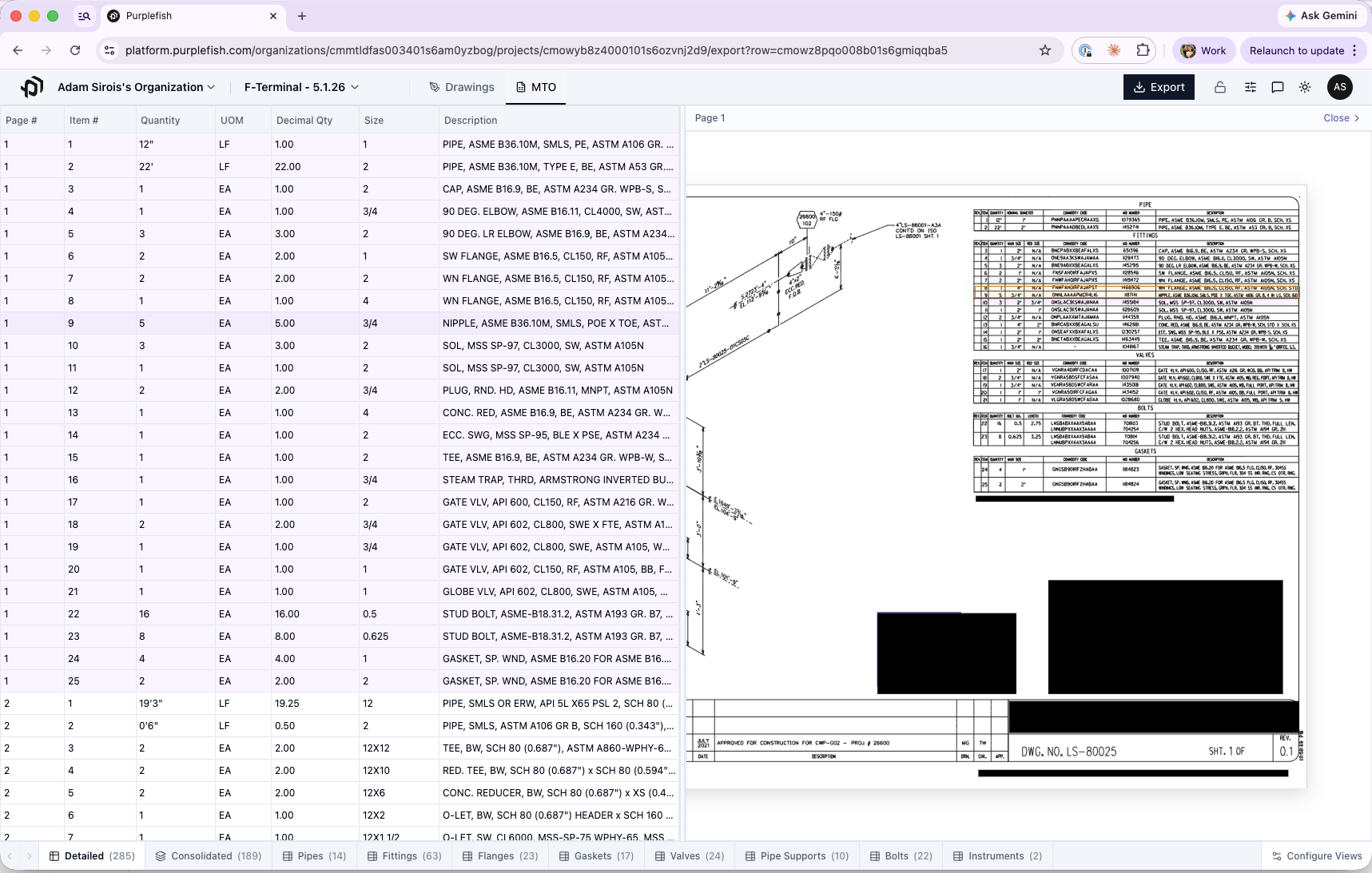
Fig. 02 — Click any BOM line item to see the exact ISO it came from.
2. Drill into any row on the Consolidated view (The Roll Up). The Consolidated view rolls up matching items across your whole packet into total quantities. Now you can click any of those rolled-up rows to see every individual line item that contributes to that total, and from there, click through to the ISO each one came from. If you see 24 stud bolts, one click shows you it's 8 from one drawing and 16 from another.
3. Customize your Columns. Shop fabricator that doesn't need every piece of title block info? Hide those columns. Prefer a specific column order? Set it once and save it for all future projects. Works the same way you'd hide columns in Excel, just faster.
4. Customize your Views (Excel Sheets). Need procurement-ready breakdowns by component type or material? Those are built in as separate views, so you can hand the right sheet to the right person without rebuilding anything.
BOM Extraction Accuracy from ISOs: up to 99.5%
Accuracy is still priority number one, and it keeps climbing. Over the last month, our average BOM extraction accuracy across all pages audited by our QA team was over 99.5%, up from 99.3% the month before.
To put a finer point on it: in the past week we ran 6 audits of 20 randomized pages each. 5 of the 6 came back 100% accurate (zero material errors).
Purplefish's extracted BOM data is audited against the source drawings row by row and character by character. A material error is any discrepancy that could affect an estimate, including missing rows or items, extra rows or items, wrong or missing quantities or sizes, wrong or missing descriptions.
The audit excludes immaterial differences such as capitalization, extra spaces, minor formatting variations, non-critical spelling differences, and columns that do not affect the estimate.
Accuracy formula:
Accuracy = (Rows audited - material errors) / rows auditedWe're getting to the point where our Document Engine is catching more engineering errors in the original BOMs than Purplefish errors! We're starting to flag those to estimators right in the platform.
What's next? Attention: Pipe Fabricators
We're working on Labor Takeoff. If you work in pipe fabrication and want a hand in shaping what that looks like, we'd love to talk: hello@purplefish.com
Full bore ahead,
Adam & Martin
& the Purplefish Team