The Purplefish Pipeline || September: QC Notes, Faster LTO Review & Bidding from a BOM
The latest on what we're building, what we're learning, and what's improving inside Purplefish.
Purplefish is an AI-powered material and labor takeoff platform for pipe fabrication contractors. Welcome to the latest update on what we're building, what we're learning, and what's improving inside Purplefish.
📝 QC Notes: ISO issues that need your eyes before you bid
Every package gets a human QC pass. Most of our reviewers have worked as pipe estimators, so they know which problems change a bid. At this stage, they find far more errors in the engineering than in our takeoff. When they find one, they leave it on the drawing with a yellow label for you to check.
Open the Review tab and you get the list in a sidebar on the left of the drawings. Each note is pinned to the exact spot on the drawing. Each one says what we saw, what we assumed, and what we need you to confirm. Some recent examples:
- BOM & Drawing Disagree: Item 13 (18" Gate Valve): the BOM says 4, the drawing shows 5.
- Branch With No Fitting: the drawing shows a 2" branch off the 10" header, but the BOM has no tee or olet for it.
- BOM & Drawing Disagree: the drawing shows a 12" Conc Reducer that is not in the BOM.
- Illegible Values: several Qty values obstructed by a QR code. This pattern continues on multiple pages. To see all instances, look for blank/yellow cells in the Qty column of the MTO.
- Tie Point Confirmation: the endpoint is marked "OPEN END," but it is also identified as "CONNECT TO T-80." We treated this as a TP since the line is intended to connect to T-80.
You make the call on each one. Keep our assumption or change it to resolve the note.
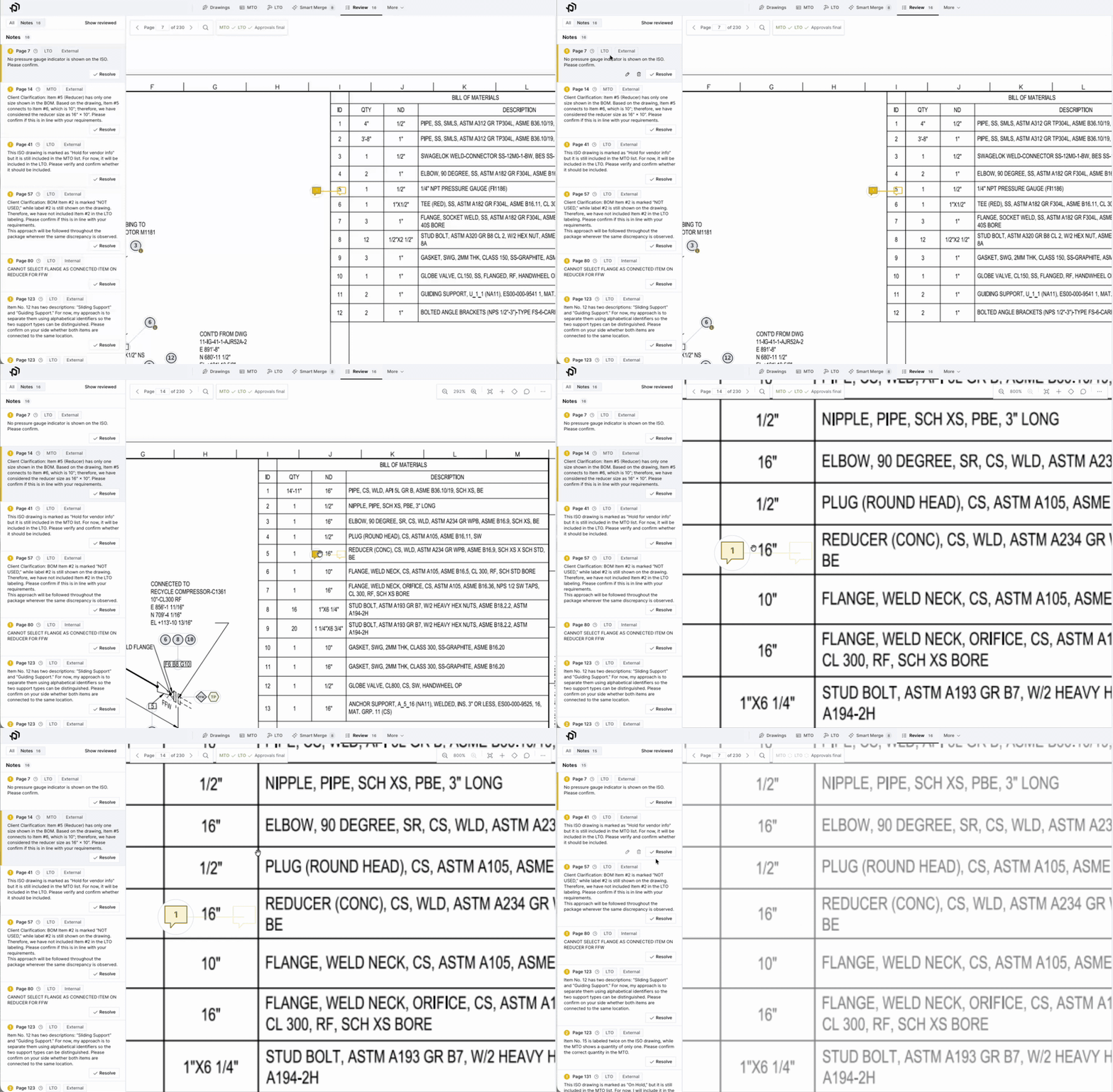
Fig. 02 — QC Notes in the Review tab: pinned to the drawing, resolved in one click.
Many of these are errors in the engineer's package, which makes them potential RFIs. The note already names the page, the item and the conflict, so most of the RFI is written before you start.
📋 No ISOs? Bid it from the BOM.
Not every bid comes with ISOs. When the owner or engineer sends a BOM or an MTO, upload the spreadsheet to Purplefish. You get two things back:
- A clean MTO. Your columns mapped to a standard format and rolled up with Smart Merge, with no Excel cleanup.
- A more accurate LTO, included. Weld and joint counts from the same joint engine we run on ISOs.
The usual way to count welds from a BOM is to count component ends: an elbow counts as two, a tee counts as three. That method counts the same weld twice wherever two fittings connect to each other. Our joint engine matches ends into joints, so each weld is counted once.
In our comparisons, the joint engine has been about 15% more accurate on average. The gap is wider on jobs with a lot of fitting-to-fitting connections.
Try it out on your next material dump: just upload the Excel file like you would an ISO package!
⚡ LTO review is faster
Last month we said our biggest project was making LTO verification faster. Here is what changed:
- Unpaired ends, drawing by drawing. Walk through items or joints that need some classification alongside each drawing.
- Quantified Assumptions. We show how much the assumed joints affect the total, so you know where to spend your time.
- Fix it once. Correct an end on one part and apply it to the matching parts on every page.
🛠 You asked, we built
- Cuts & Bevels worksheet, with the shop and field split.
- Excel exports keep your view. The columns and filters you set on screen carry into the export.
- Drop a folder or a ZIP file to start a project.
- Centerline lengths cover more fitting types, up to NPS 48. A blank centerline now tells you why it is blank.
Full bore ahead,
Adam & Martin
& the Purplefish Team